 Copilot Cost Lens
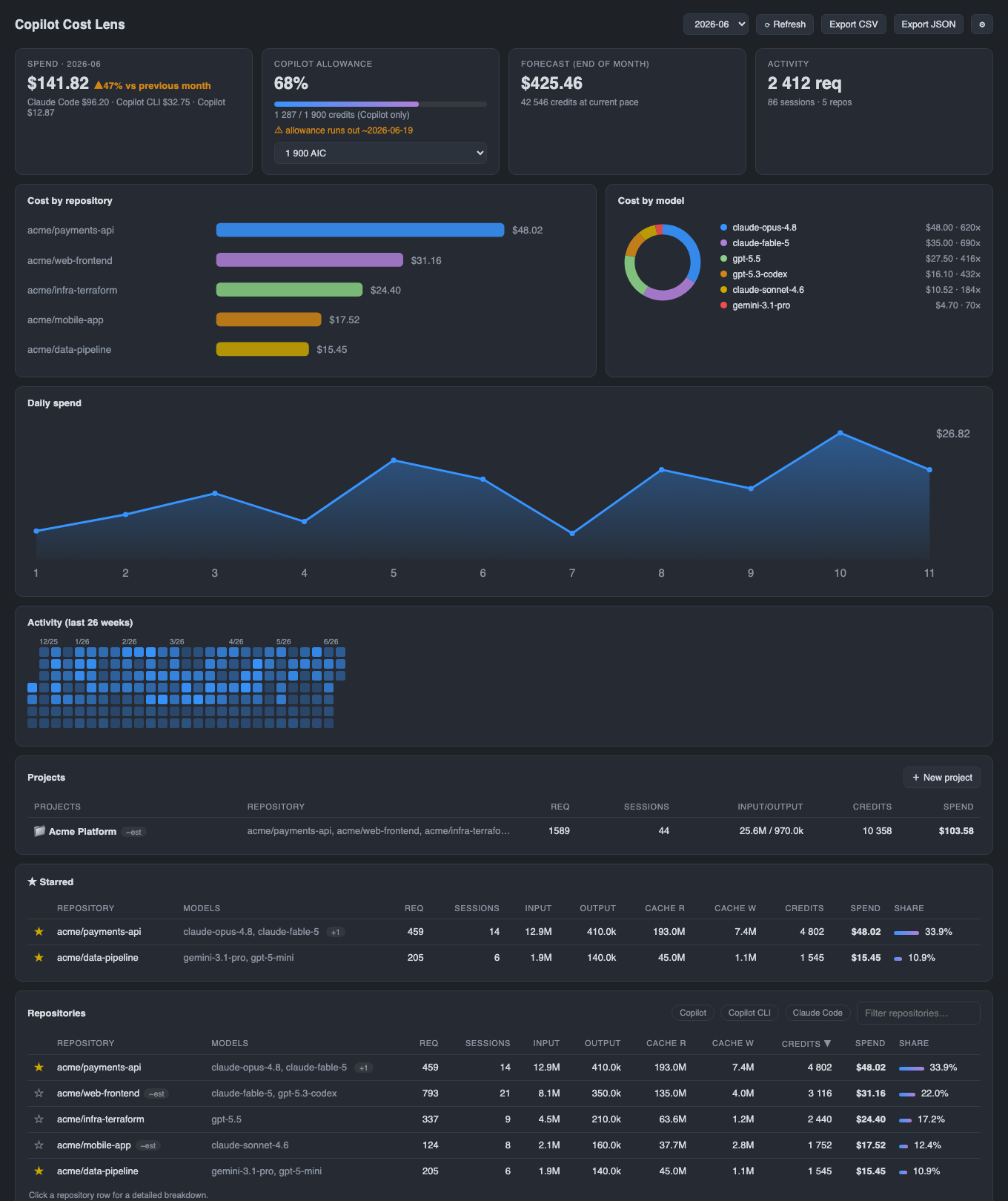
Cost per repository
Every chat request is attributed to the workspace it ran in and resolved to an owner/repo slug from the project's git remote — so you see exactly which project spent what.
For VS Code & JetBrains IDEs · Copilot · Copilot CLI · Claude Code
GitHub's billing page gives you one account-level total. Copilot Cost Lens reads the logs Copilot, the Copilot CLI and Claude Code already keep on your machine, attributes every request to the repository you were in, prices it by model — and turns it into a live dashboard and a status-bar ticker. Per repository, per model, per day. 100% local.
Since Copilot moved to usage-based AI Credits, the question isn't "how many requests?" but "which project is burning my credits, on which model, and will I fit my allowance?" Here are the answers, in your editor.
Every chat request is attributed to the workspace it ran in and resolved to an owner/repo slug from the project's git remote — so you see exactly which project spent what.
VS Code Copilot Chat, the Copilot CLI agent and Claude Code transcripts in a single view, with a per-provider split. Claude Code is shown but never counts against your Copilot allowance.
An allowance gauge, end-of-month forecast, month-over-month trend and a projected allowance-exhaustion date. Set credit and dollar budgets; the status bar turns orange before you blow them.
Input, output, and cache read/write tokens per repository, the exact models used, a cost-by-model donut, cache-read share, and the effective blended $/1M you're really paying.
Open any repo for model mix and daily trend, roll repos into named projects, star the important ones, browse an all-time view and activity heatmap — and export a printed-receipt PDF for chargeback.
Instant text filter, source chips, sortable columns and starred repos pinned on top. One-click CSV/JSON export, multi-editor scanning, and a UI localized in English, Čeština, Deutsch and 日本語.
The same engine and the same dashboard in two editions — a VS Code extension and a JetBrains IDE plugin (built on JCEF, so it looks and behaves identically). Pick your editor; the numbers come out the same.
VS Code · Insiders · VSCodium · Cursor · Windsurf
IntelliJ IDEA · WebStorm · PyCharm · GoLand · Rider & more · 2024.3+
No new agent, no proxy, no account. Cost Lens combines the local telemetry your AI tools already write to disk, prices it, and presents it. When exact billed data exists it's used; estimates are always labelled ~est.
VS Code Copilot transcripts and debug logs, the Copilot CLI session-state, and Claude Code transcripts — most with exact token counts and billed AI-credit units per request.
Billed AI-credit units when present, otherwise exact tokens × a built-in model price table covering GPT, Claude, Gemini, Grok and more. Every rate is overridable — no waiting for an update when pricing changes.
A live dashboard, a status-bar ticker with a 7-day sparkline, per-repo and per-project drill-downs, and CSV/JSON/PDF exports for invoicing and chargeback.
Cost Lens is an independent open-source project, not affiliated with GitHub or Microsoft. The log format isn't a stable public API, and the figures are an analytical aid, not a bill — your GitHub billing page remains the source of truth.
Spend data is sensitive, and Cost Lens treats it that way. Everything happens locally — there's simply nowhere for your numbers to go.
Cost Lens makes zero network requests. It reads local files only — your VS Code workspace storage and the Copilot CLI / Claude Code stores in your home directory.
Nothing is collected, phoned home, or shared with anyone — including the author. There is no account to create and no data to opt out of.
Repository names are read from workspace.json and .git/config as plain files. Cost Lens never executes git or any other command on your machine.
No. Cost Lens reads local log files only, makes no network requests, and collects no telemetry. There's no backend and no account — your numbers stay on your computer.
GitHub Copilot Chat, the Copilot CLI, and Claude Code, with an opt-in source for JetBrains Copilot. It automatically scans VS Code, VS Code Insiders, VSCodium, Cursor and Windsurf storage.
They're an analytical aid, not a bill. Cost Lens uses billed AI-credit units when the logs contain them and prices the rest from a model-rate table. The log format isn't a stable public API, so treat your GitHub billing page as the source of truth.
It resolves the workspace to an owner/repo slug by reading workspace.json and .git/config as plain files — it never executes git. Requests without a remote are grouped by folder.
Yes — a native plugin for IntelliJ IDEA, WebStorm, PyCharm, GoLand, Rider and the rest of the JetBrains family (2024.3+, Java 17). It renders the same dashboard through JCEF and is at feature parity with the VS Code edition. Install it from the JetBrains Marketplace (source on GitHub). Either edition reads the same on-disk logs, so they report identical numbers — and both scan VS Code, Insiders, VSCodium, Cursor and Windsurf storage out of the box.
It's free and open source — install it from the VS Code Marketplace or browse the code on GitHub.
Install in under a minute. Your historical sessions are picked up on the first scan, so the dashboard has something to show the moment it opens.